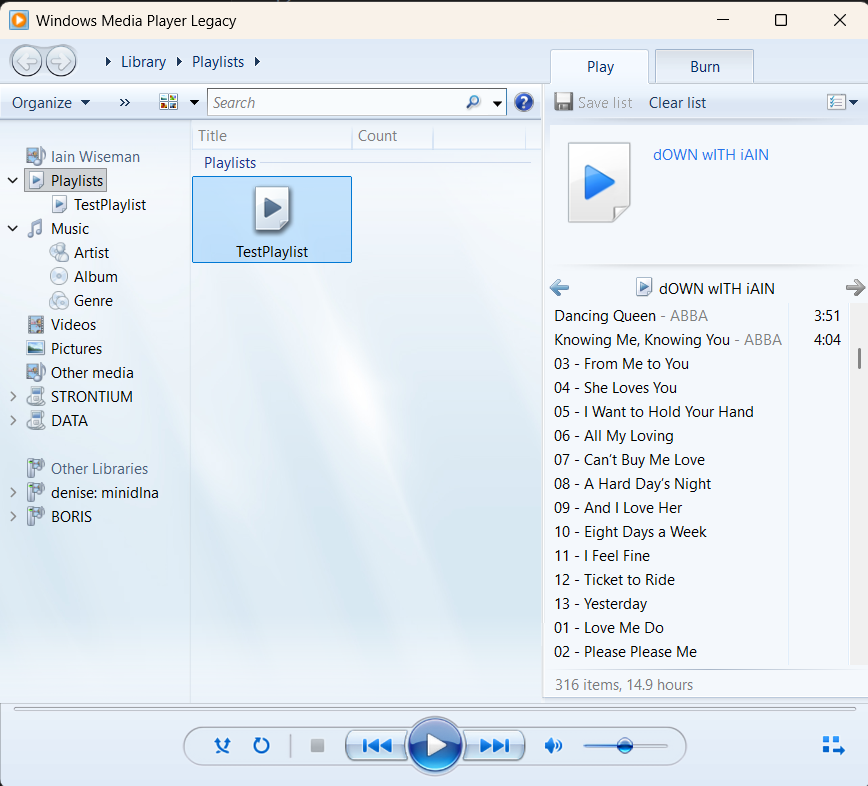
I keep all my music on a Samba server running Ubuntu so it’s easy to share around the house. Over time, my Windows Media Player playlists — and I have more than a hundred of them — ended up with broken paths and tracks that no longer play. Most of the time it’s because the original files were replaced with better-quality versions, so the old paths simply don’t exist anymore. Now that Windows 11 finally supports M3U properly, it felt like the perfect moment to tidy everything up and make my playlists RhythmBox and VLC friendly again.
Approach
For the playlists, Windows Media Player uses a proprietary its own format for play lists but basically all you have is a path to your track under the src tag.
<?wpl version="1.0"?>
<smil>
    <head>
        <meta name="Generator" content="Microsoft Windows Media Player -- 12.0.17134.48"/>
        <meta name="ItemCount" content="260"/>
        <author/>
        <title>dOWN wITH iAIN</title>
    </head>
    <body>
        <seq>
            <media src="\\DENISE\Music\1 - Music\3 - MUSIC\ABBA\More ABBA Gold (remastered)\06 - So Long.mp3"/>
            <media src="\\DENISE\Music\1 - Music\3 - MUSIC\ABBA\More ABBA Gold (remastered)\01 - Summer Night City.mp3"/>
            <media src="\\DENISE\Music\1 - Music\3 - MUSIC\ABBA\More ABBA Gold (remastered)\02 - Angeleyes.mp3"/>
            <media src="\\DENISE\Music\1 - Music\3 - MUSIC\ABBA\More ABBA Gold (remastered)\03 - The Day Before You Came.mp3"/>
            <media src="\\DENISE\Music\1 - Music\3 - MUSIC\ABBA\More ABBA Gold (remastered)\04 - Eagle.mp3"/>
        </seq>
    </body>
</smil>
For the Samba Server, I did keep to some sort of approach so it is not all bad news, as the tracks are organized except for CDs and MP3s.
\\server\Music
├── 1 Music
│   ├── 1 - VARIOUS ARTISTS
│   ├── 2 - SOUNDTRACKS
│   └── 3 - MUSIC
├── CDS
└── MP3S
My plan was to load all of my media into a database along with whatever metadata I could extract, and then see what patterns emerged. MediaInfo is a well‑known tool that supports all the formats I use, so I created a PostgreSQL table using the SQL below and wrote a script to run MediaInfo over every file. That process left me with roughly 100k tracks, each with its associated metadata.
CREATE TABLE music_metadata (
    music_metadata_id INTEGER GENERATED ALWAYS AS IDENTITY PRIMARY KEY,
    path TEXT NOT NULL UNIQUE,
    extension TEXT,
    song TEXT,
    artist TEXT,
    album TEXT,
    year TEXT,
    genre TEXT,
    format TEXT,
    duration TEXT,
    size BIGINT,
    bitrate TEXT,
    writing_library TEXT,
    has_cover BOOLEAN,
    mtime BIGINT,
    ctime BIGINT,
    btime BIGINT,
    mediainfo_empty BOOLEAN,
    mediainfo_crashed BOOLEAN,
    cleaned_filename TEXT
);
The next challenge was figuring out how to reliably match the playlist paths to the corresponding entries in the database. There are really only three ways to resolve missing tracks: remove them from the playlist, manually browse for the correct file, or use the database to locate where the track now lives. It was that last option that ended up taking most of my attention.
Technology
If I was in work, I would probably build something in whatever the company used and people who knew but not at work so I thought I would use C# as I have been using it on other projects for a couple of months and I am on windows for the first time in a few decades. So given this I decided to use WinUI 3.0 as I have never seen it before, and make a REST API for the backend.
The Frontend
I always like to start with visuals, because it’s much easier—at least for me—to understand a problem once I can see it. Here’s the main window. When the user opens a playlist, the left‑hand side displays all tracks, with missing ones highlighted in red. On the right, those missing tracks are listed again along with the three options mentioned earlier. Delete removes the track from both sides, Browse lets the user locate the file manually, and if a match is found, the entry disappears from the right and the path on the left is updated.
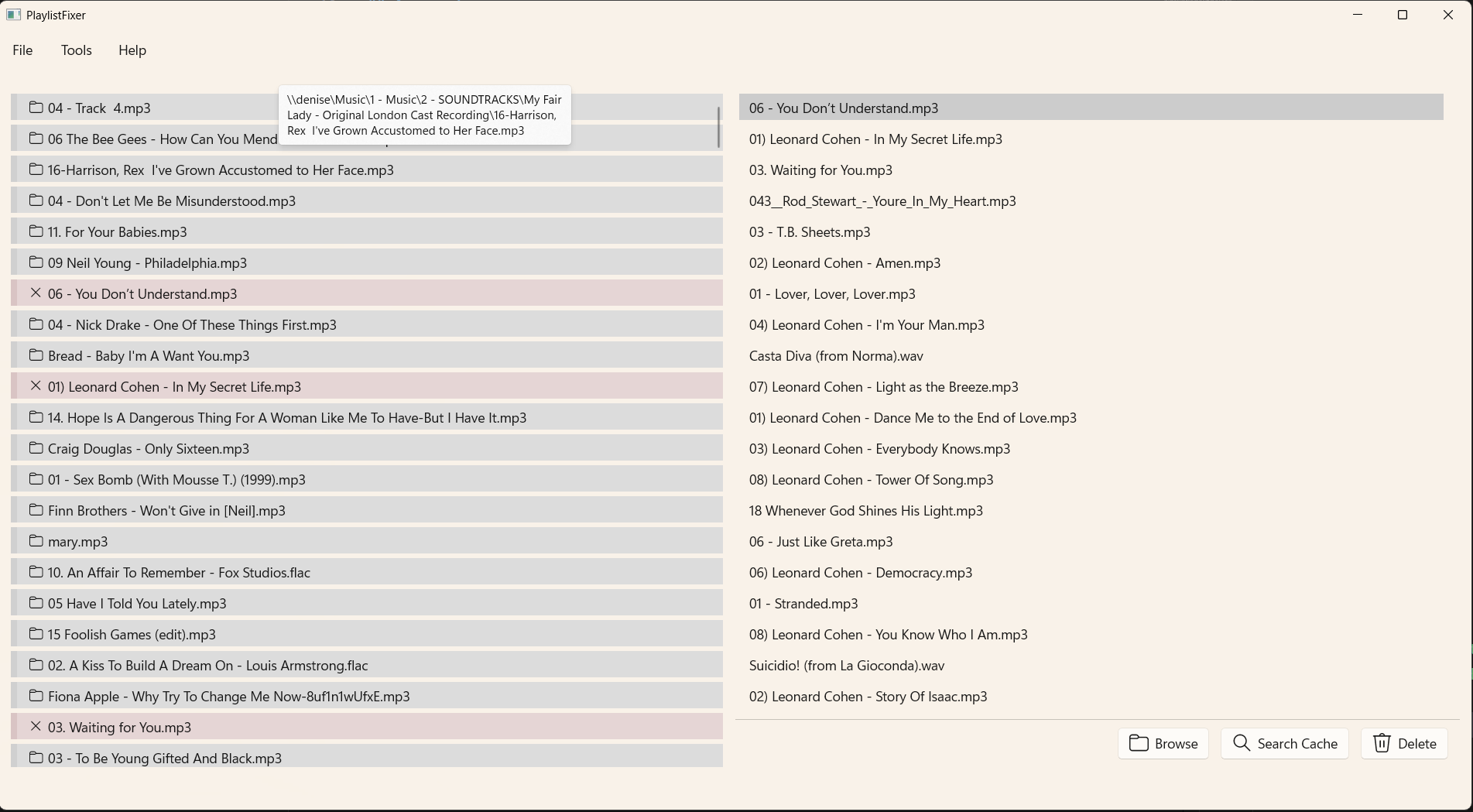
You can see that the path from the playlist is not exactly consistent but more about that later. Pressing the Search Cache button, search the PostgreSQL table and returns possible matches.
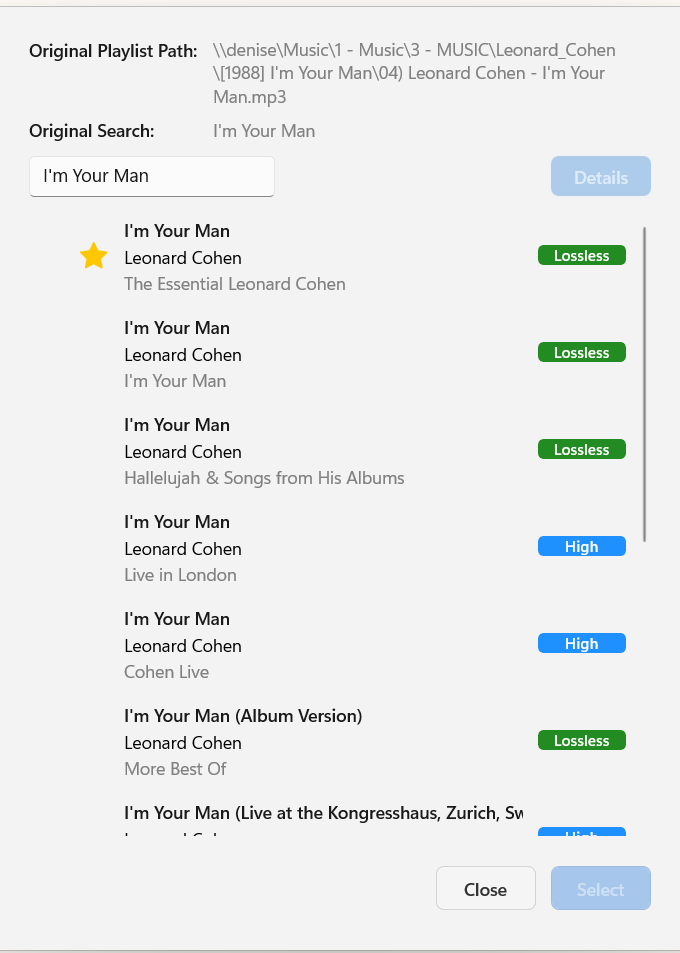
For I’m Your Man, for example, the search returns six different artists who have recorded a song with that title — and six separate tracks by Leonard Cohen alone. With more than 500 missing tracks across the playlists, making the selection process as straightforward as possible becomes essential.
Application Challenges
So to make the right Track be at the top I approach this by
- Cleaning the filename
- Using the Known File Structure
- Deriving the Artist from the Playlist Path
- Scoring the the matches
Cleaning the filename
Now that I had around 100k tracks tucked safely into the database — plus a little regex‑powered robot to help me out (I’m hopeless at regex and usually end up asking the youngest CS person in the room) — I started looking at the different filename patterns:
| Pattern | Meaning / Structure |
|---|---|
track - artist - title - format | Full pattern including track number, artist, song title, and file extension (e.g., 01 - Bowie - Heroes.mp3) |
track - title - format | Track number, song title, and file extension (e.g., 03 - Hey Jude.flac) |
title - format | Song title and file extension only (e.g., Imagine.ogg) |
Of course, real‑world filenames love to improvise — sometimes it’s 1. or 1) or something entirely unexpected. So I wrote a small service to clean things up. With that in place, about 90% of the filenames fell neatly into these patterns, which meant I could reliably detect the artist whenever it was actually present.
namespace PlaylistFixer.Application.Interfaces;

public interface IFileNameCleanerService
{
    public string ExtractCandidateSong(string path);
    public string ExtractCandidateTrackName(string path);
    public string? ExtractCandidateTrackArtist(string? path);
}
Using the Known File Structure
As discussed above the media is stored under and know structure, this breaks down into two main patterns:
Folders 1 & 2 — Various Artists / Soundtracks
Files are stored as:
Album\Track - Artist - Song - formatAlbum\Track - Song - formatAlbum\Track - format
Because these are compilation‑style folders, the artist often has to be taken from the filename itself.
Folder 3 — Standard Artist / Album Structure
Files follow:
Artist\Album\Track - Artist - Song - formatArtist\Album\Track - Song - formatArtist\Album\Track - format
Here, the directory structure already gives you the artist name, so even when the filename is incomplete, it’s usually straightforward to derive the artist from the folder path.
Deriving the Artist from the Playlist Path
So for the tracks under \\DENISE\Music\1 - Music\3 - MUSIC\ABBA\ABBA Gold Greatest Hits\12 - Fernando.mp3, it is clear that the artist can be derived, we can query the know artists in the database.
Scoring the the matches
To influence the matching I created a scoring engine. There were point award if
- The song matched the cleaned song in the playlist
- Artist was found in playlist past and found in database
- The quality of the track - i.e. more points for higher bitrate or format
The Backend
So to support the frontend this was the request sent to http://localhost:5258/catalog/match.
{
  "path": "\\\\denise\\Music\\1 - Music\\3 - MUSIC\\Van Morrison\\Van.Morrison-Collection.1967-2012.MP3\\01-Studio Albums\\1970-1 - Moondance\\03 - Crazy Love.mp3",
  "userSong": "Crazy Love",
  "pathMode": "Client"
}
The pathmode makes the REST API translate the path to windows format. This returns
{
  "extractedArtist": "Van Morrison",
  "extractedSong": "Crazy Love",
  "bestMatch": {
    "path": "\\\\denise\\Music\\CDS\\Crazy Love.wav",
    "artist": "Van Morrison",
    "title": "Crazy Love",
    "album": "Moondance",
    "format": "MPEG Audio",
    "bitrate": 96000,
    "hasMetadata": true,
    "quality": 3,
    "score": 2550,
    "signals": [
      "High bitrate",
      "Artist exact match: Van Morrison",
      "Song exact match: Crazy Love",
      "Song partial match: Crazy Love",
      "Filename contains song name"
    ],
    "songQuery": "Crazy Love",
    "querySource": 0
  },
  "matches": [
    {
      "path": "\\\\denise\\Music\\CDS\\Crazy Love.wav",
      "artist": "Van Morrison",
      "title": "Crazy Love",
      "album": "Moondance",
      "format": "MPEG Audio",
      "bitrate": 96000,
      "hasMetadata": true,
      "quality": 3,
      "score": 2550,
      "signals": [
        "High bitrate",
        "Artist exact match: Van Morrison",
        "Song exact match: Crazy Love",
        "Song partial match: Crazy Love",
        "Filename contains song name"
      ],
      "songQuery": "Crazy Love",
      "querySource": 0
    },
    {
      "path": "\\\\denise\\Music\\1 - Music\\3 - MUSIC\\Emiliana Torrini\\Albums\\1995 - Crouçie d'où là\\02 - Crazy Love.mp3",
      "artist": "Emiliana Torrini",
      "title": "Crazy Love",
      "album": "Crouçie d'où là",
      "format": "MPEG Audio",
      "bitrate": 320000,
      "hasMetadata": true,
      "quality": 3,
      "score": 1550,
      "signals": [
        "High bitrate",
        "Song exact match: Crazy Love",
        "Song partial match: Crazy Love",
        "Filename contains song name"
      ],
      "songQuery": "Crazy Love",
      "querySource": 1
    },
    {
      "path": "\\\\denise\\Music\\1 - Music\\3 - MUSIC\\Perla Batalla\\Perla Batalla - Perla Batalla - 2015\\03 - Crazy Love.mp3",
      "artist": "Perla Batalla",
      "title": "Crazy Love",
      "album": "Perla Batalla",
      "format": "MPEG Audio",
      "bitrate": 320000,
      "hasMetadata": true,
      "quality": 3,
      "score": 1550,
      "signals": [
        "High bitrate",
        "Song exact match: Crazy Love",
        "Song partial match: Crazy Love",
        "Filename contains song name"
      ],
      "songQuery": "Crazy Love",
      "querySource": 1
    },
    {
      "path": "\\\\denise\\Music\\1 - Music\\3 - MUSIC\\Thea Gilmore\\Thea Gilmore Loft Music\\06-Crazy Love.mp3",
      "artist": "Thea Gilmore",
      "title": "Crazy Love",
      "album": "Loft Music",
      "format": "MPEG Audio",
      "bitrate": 110037,
      "hasMetadata": true,
      "quality": 3,
      "score": 1550,
      "signals": [
        "High bitrate",
        "Song exact match: Crazy Love",
        "Song partial match: Crazy Love",
        "Filename contains song name"
      ],
      "songQuery": "Crazy Love",
      "querySource": 1
    },
    {
      "path": "\\\\denise\\Music\\1 - Music\\3 - MUSIC\\Paul Simon\\Graceland\\16 - Crazy Love (Demo)  Bonus Track.mp3",
      "artist": "Paul Simon",
      "title": "Crazy Love (Demo) / Bonus Track",
      "album": "Graceland",
      "format": "MPEG Audio",
      "bitrate": 320000,
      "hasMetadata": true,
      "quality": 3,
      "score": 750,
      "signals": ["High bitrate", "Song partial match: Crazy Love", "Filename contains song name"],
      "songQuery": "Crazy Love",
      "querySource": 1
    },
    {
      "path": "\\\\denise\\Music\\1 - Music\\3 - MUSIC\\Paul Simon\\Graceland\\09 - Crazy Love, vol. II.mp3",
      "artist": "Paul Simon",
      "title": "Crazy Love, vol. II",
      "album": "Graceland",
      "format": "MPEG Audio",
      "bitrate": 320000,
      "hasMetadata": true,
      "quality": 3,
      "score": 750,
      "signals": ["High bitrate", "Song partial match: Crazy Love", "Filename contains song name"],
      "songQuery": "Crazy Love",
      "querySource": 1
    }
  ]
}
You can easily see why the best match was chosen. It is not perfect, and I could spent another couple of weeks making if better but the user (and it is me), can browse to the track taking into account the path name.
Technical Challenges of WinUI 3.0
Want to apologise to anyone who uses this across platforms and says I am using it for the wrong thing. All of the code is in my gitea site here
- WinUI and Xaml
For me this was a step into the dark ages and reminds me of when I used to do Xml Layouts with Android before Composition UI. I might have missing it, but I could not find a GUI builder for this so you are left with this
<?xml version="1.0" encoding="utf-8"?>
<Window
        x:Class="PlaylistFixer.Presentation.Views.MainWindow"
        xmlns="http://schemas.microsoft.com/winfx/2006/xaml/presentation"
        xmlns:x="http://schemas.microsoft.com/winfx/2006/xaml"
        xmlns:controls="using:PlaylistFixer.Presentation.Controls.MainWindow"
        xmlns:common="using:PlaylistFixer.Presentation.Controls.Common"
        xmlns:d="http://schemas.microsoft.com/expression/blend/2008"
        xmlns:mc="http://schemas.openxmlformats.org/markup-compatibility/2006"
        mc:Ignorable="d"
        Title="PlaylistFixer">

        <Window.SystemBackdrop>
                <MicaBackdrop/>
        </Window.SystemBackdrop>

        <!-- REAL ROOT GRID -->
        <Grid x:Name="RootGrid">

                <!-- Define the layout for the entire window -->
                <Grid.RowDefinitions>
                        <RowDefinition Height="Auto"/>
                        <!-- Menu -->
                        <RowDefinition Height="*"/>
                        <!-- Main content -->
                        <RowDefinition Height="32"/>
                        <!-- Status bar -->
                </Grid.RowDefinitions>

                <!-- Menu -->
                <controls:AppMenuBarControl
                        x:Name="AppMenuBarControl"
                        Grid.Row="0"/>

                <!-- Main content -->
                <Grid Grid.Row="1"
                      Padding="12">
...
... Tons and tons more of this
...
</Window>
The robot was pretty good with this but it really isn't the way to build a GUI anymore.
- WinUI Compiler
The WinUI Compiler only provides errors if you use Visual Studio. I have not found it possible to vS Code and see an error so I end up going to Visual Studio to build the GUI and back to VS Code for the code.
- WinUI Definitions not Found
The UI compiler produces code on the fly but VS Code is unable to find it and misleading highlighted the missing code. For this there was a workaround, you change your project, in my case, presentation.csproj, to generate the code into the build directory, this resolves the issue for VS Code but causes issues with Visual Studio so you need to comment it out if you have to use Visual Studio - very frustrating
  <!-- Design-Time Build Support -->
  <ItemGroup Condition="'$(DesignTimeBuild)' == 'true'">
    <Compile Include="$(IntermediateOutputPath)**/*.g.cs" />
    <Compile Include="$(IntermediateOutputPath)**/*.g.i.cs" />
  </ItemGroup>
- WinUI Controls
For my app, I wanted to remember folder names, when browsing and when opening a playlist so I the user is not forced to re-navigate. I was hoping this would be trivial and I would just need to hold to config and pass the start folder. This is not support in WinUI, probably for security reasons. Anyway in the end I ended up using the native controls much like the days of MFC and C++.
namespace PlaylistFixer.Presentation.Helpers;

using System;
using System.Runtime.InteropServices;
using System.Text;

using PlaylistFixer.Presentation.Interop;

internal static partial class Win32FileDialog
{
    [DllImport("comdlg32.dll", CharSet = CharSet.Unicode, SetLastError = true)]
    [return: MarshalAs(UnmanagedType.Bool)]
    private static extern bool GetOpenFileName(ref OPENFILENAME ofn);

    [DllImport("comdlg32.dll", CharSet = CharSet.Unicode, SetLastError = true)]
    [return: MarshalAs(UnmanagedType.Bool)]
    private static extern bool GetSaveFileName(ref OPENFILENAME ofn);


    public static string? ShowDialog(
        bool saveDialog,
        string initialDirectory,
        string? defaultName,
        string title,
        string filter,
        int flags)
    {
        // Convert filter string: replace null chars properly
        // Filter should already be in format "Text Files\0*.txt\0All Files\0*.*\0"
        var filterBytes = Encoding.Unicode.GetBytes(filter);
        var filterPtr = Marshal.AllocHGlobal(filterBytes.Length + 2); // +2 for final null terminator
        Marshal.Copy(filterBytes, 0, filterPtr, filterBytes.Length);
        Marshal.WriteInt16(filterPtr, filterBytes.Length, 0); // Add final null terminator

        var initialDirPtr = Marshal.StringToHGlobalUni(initialDirectory);
        var titlePtr = Marshal.StringToHGlobalUni(title);

        // file buffer - needs to be larger for safety
        var fileBuffer = Marshal.AllocHGlobal(520); // 260 chars * 2 bytes per Unicode char

        // Initialize buffer to zeros
        for (var i = 0; i < 520; i++)
        {
            Marshal.WriteByte(fileBuffer, i, 0);
        }

        // pre-populate filename for save dialog
        if (defaultName is not null)
        {
            var nameBytes = Encoding.Unicode.GetBytes(defaultName);
            Marshal.Copy(nameBytes, 0, fileBuffer, Math.Min(nameBytes.Length, 518));
        }

        var ofn = new OPENFILENAME
        {
            lStructSize = Marshal.SizeOf<OPENFILENAME>(),
            hwndOwner = IntPtr.Zero,
            hInstance = IntPtr.Zero,
            lpstrFilter = filterPtr,
            lpstrCustomFilter = IntPtr.Zero,
            nMaxCustFilter = 0,
            nFilterIndex = 1,
            lpstrFile = fileBuffer,
            nMaxFile = 260,
            lpstrFileTitle = IntPtr.Zero,
            nMaxFileTitle = 0,
            lpstrInitialDir = initialDirPtr,
            lpstrTitle = titlePtr,
            Flags = flags,
            nFileOffset = 0,
            nFileExtension = 0,
            lpstrDefExt = IntPtr.Zero,
            lCustData = IntPtr.Zero,
            lpfnHook = IntPtr.Zero,
            lpTemplateName = IntPtr.Zero,
            pvReserved = IntPtr.Zero,
            dwReserved = 0,
            FlagsEx = 0
        };

        var result = saveDialog
            ? GetSaveFileName(ref ofn)
            : GetOpenFileName(ref ofn);

        string? file = null;
        if (result)
        {
            file = Marshal.PtrToStringUni(ofn.lpstrFile);
        }
        else
        {
            // Get the error code for debugging
            var error = Marshal.GetLastWin32Error();
            System.Diagnostics.Debug.WriteLine($"GetSaveFileName/GetOpenFileName failed with error: {error}");
        }

        // cleanup
        Marshal.FreeHGlobal(filterPtr);
        Marshal.FreeHGlobal(initialDirPtr);
        Marshal.FreeHGlobal(titlePtr);
        Marshal.FreeHGlobal(fileBuffer);

        return file;
    }
}
- Build Package
Could not build this with VS Code and had to use Visual Studio. Again, all my fault, I don't want to use a second editor, 3rd if you count vi. It was quite smooth once I understood how to do it in Visual Studio and again very Androidy.